Of course the other challenge of the SSB Exciter project is writing the Arduino sketch to control the three outputs of the Si5351 synthesiser. The sketch will run on an Arduino Nano with limited program memory, so can't be too fanciful and must be optimised throughout.
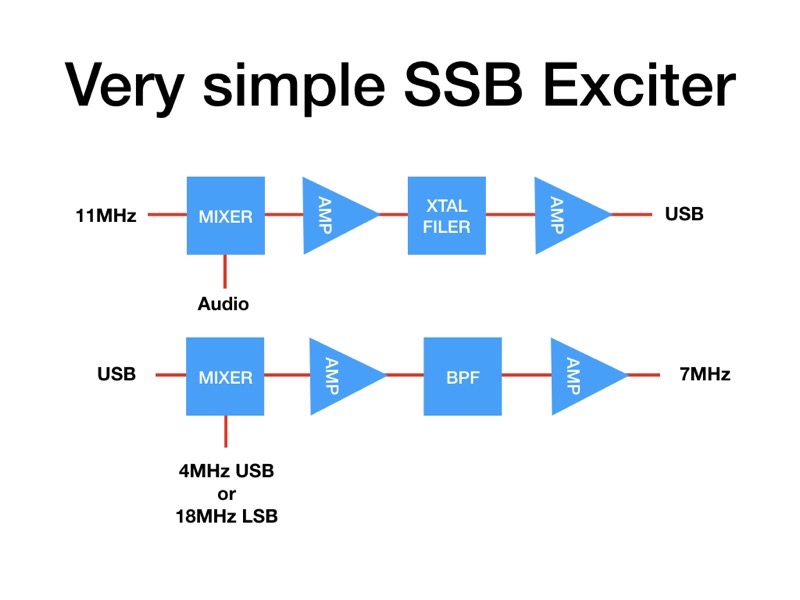
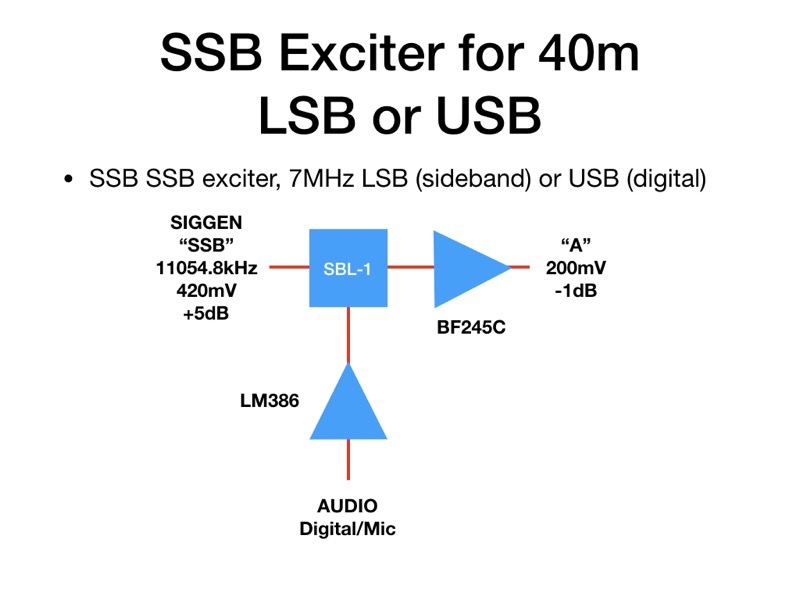
It needs to generate three outputs. CLK0 will be a 7.0-7.2MHz frequency for the VFO of the DCRX Direct Conversion Receiver. CLK1 will be the 11MHz input to the first SSB mixer (11054.8kHz for USB generation. CLK2 must be the mixing frequency to get the USB & LSB 11MHz signals to a final 7.0-7.2MHz for the 40m band. This is done by outputting SSB - freq for USB and a SSB + freq for LSB.
The code runs on the SIGGEN hardware designed during the BARSicle project (see many previous postings), an Arduino Nano drives an OLED display and a three output Si5351 synthesiser module, controlled by a rotary encoder with push switch.
The rotary encoder will tune in 10kHz to 10Hz steps, chosen by a short push on the encoder switch. A long 'hold' on the switch will change from USB to LSB and back. The OLED display will be simple, showing the tuned frequency (in kHz 7000.00 to 7200.00)), the sideband (USB or LSB) and the tuning step (10H to 10kHz). The previously written "Oled.h" header file using the u8g2 library will format these displays.
Here's the initial code, not yet available for download but can be cut and pasted from here, The libraries are part of previous downloads available (look below)
// SSB_EXCITER
// CLK0 = RX, CLK1 = SSB (11MHz), CLK2 = VFO (4 | 18MHz)

#include "Oled.h"                                         // include header
#include "si5351.h"                                       // include library
#include "Rotary.h"                                       // include library

#define CLK 3                                             // encoder connnections
#define DT 2                                              // reverse 2&3 if wrong direction
#define SW 4
#define HOLD 500                                          // held button time > 0.5sec

#define CALIBRATION -150000                               // frequency CALIBRATION

#define SSB 1105480000                                    // SSB USB freq

Si5351 dds;                                               // create dds object
Rotary enc = Rotary(CLK, DT);                             // create enc object

uint64_t freq = 700000000;                                // first init freq (cHz), 7MHz
uint64_t freqStep = 100000;                               // init step (cHz), 1kHz

bool sideband = true;                                     // start on USB

void setup() {
  pinMode(CLK, INPUT_PULLUP);                             // encoder inputs, with pull-ups
  pinMode(DT, INPUT_PULLUP);
  pinMode(SW, INPUT_PULLUP);

  oled.begin();                                           // begin OLED

  dds.init(SI5351_CRYSTAL_LOAD_8PF, 0, CALIBRATION);      // set xtal capacitance, 25MHz, & CALIBRATION

  dds.drive_strength(SI5351_CLK0, SI5351_DRIVE_8MA);      // output drive (~+10dBm)
  dds.drive_strength(SI5351_CLK1, SI5351_DRIVE_8MA);      // output drive (~+10dBm)
  dds.drive_strength(SI5351_CLK2, SI5351_DRIVE_8MA);      // output drive (~+10dBm)

  dds.output_enable(SI5351_CLK0, 1);                      // enable
  dds.output_enable(SI5351_CLK1, 1);                      // enable
  dds.output_enable(SI5351_CLK2, 1);                      // enable

  freqOut(freq);                                          // output initial frequencies

  dispUpdate();                                           // display
}

void loop() {
  long hold;                                              // button hold time
  unsigned char result;                                   // encoder result

  if (digitalRead(SW) == LOW) {                           // enc button push
    hold = millis();                                      // start hold count
    while (!digitalRead(SW));                             // wait release
    if (millis() - hold > HOLD) {                         // button hold > HOLD time, change sideband
      sideband = !sideband;
      freqOut(freq);                                      // update frequencies
      dispUpdate();
    }
    else if (freqStep == 1000) freqStep = 1000000;        // update step if 10Hz -> 10kHz
    else freqStep = freqStep / 10;                        // step down
    dispUpdate();                                         // display
  }

  result = enc.process();                                 // read encoder
  if (result == DIR_CW) {                                 // freq up
    freq += freqStep;
    freqOut(freq);
    dispUpdate();
  }
  if (result == DIR_CCW) {                                // freq down
    freq -= freqStep;
    freqOut(freq);
    dispUpdate();
  }
}

// CLK0 = RX, CLK1 = SSB (11MHz), CLK2 = VFO (4 | 18MHz)
void freqOut(uint64_t freq) {
  dds.set_freq(freq, SI5351_CLK0);                         // RX freq 7MHz
  dds.set_freq(SSB, SI5351_CLK1);                          // SSB freq

  if (sideband) {
    dds.set_freq(SSB - freq, SI5351_CLK2);                 // VFO USB freq
  }
  else {

    dds.set_freq(SSB + freq, SI5351_CLK2);                 // VFO LSB freq
  }
}

void dispUpdate() {                                        // picture loop
  oled.firstPage();
  do {
    dispMsg(35, 0, "SSB TCVR");                                 // display title
    dispFreq(15, 20, freq / 100, 0, 2);                    // display frequency, in kHz
    if (sideband)
      dispMsg(10, 50, "USB");
    else
      dispMsg(10, 50, "LSB");
    dispStep(80, 50, freqStep / 100);                      // display step freq
  } while ( oled.nextPage() );
}