Try my new download site
M0IFA.me
The organisation is in the readme.txt file. Feel free to download and reuse any of the content. Some libraries are covered by licences.
Friday, 15 March 2019

Thursday, 14 March 2019
SSB Exciter Hardware
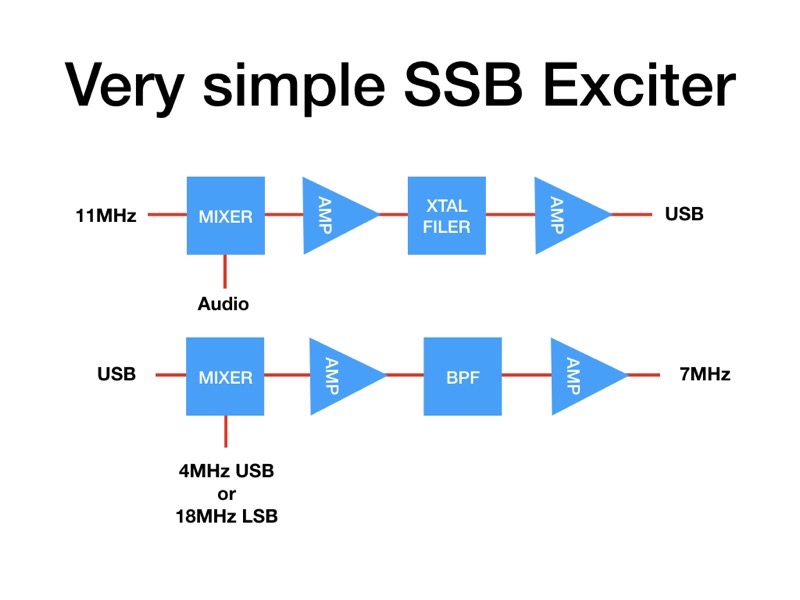
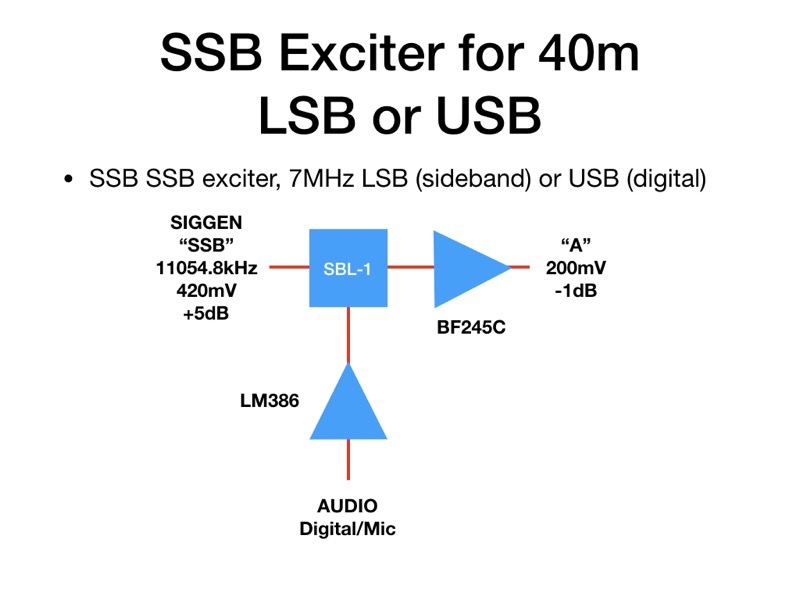
This is the hardware design, so far, for the minimal SSB exciter. It has been made as simple as possible, and does not give a super performance. It was developed to illustrate the principle of SSB generation.





Sunday, 3 March 2019
The FT8 world's gone mad
It's Sunday, the day when all radio amateurs find the chance to get in their shacks. And wow are they hitting the airwaves today, with FT8's 3kHz bandwidth around 7074kHz jam packed full. Look:
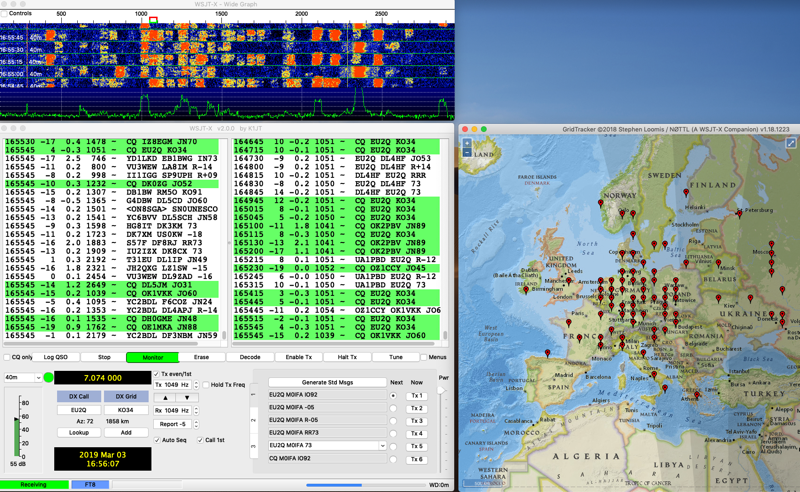
This is the signals from my tiny loop antenna fed directly to my Elektor Arduino/SDR.
If you're a MacOS man...
Windows is not the dominant OS these days, many are using Linux and many more MacOS on Apple computers. But the world of Amateur radio is poorly served by manufacturers, especially SDR transceiver people, for the Mac. So here's what I have found so far
I am using the windows emulator Crossover (basically a graphic front end to the open source "Wine" system.
MACOS native apps
1. MultiMode Cocoa - just about every digital mode supported, PSK31, SSTV etc
2. cocoaModem - another app supporting digital modes, including here Hellscriber
3. MultiScan - for SSTV
4. fldigi - well known digi-mode app
5. SDR Radio - a rather poor SDR program, great, simple interface but poor config and audio management
6. gqrx - works well for rTL sticks
7. cubicSDR - the out and out winner SDR program. But a bit "industrial", not a friendly interface
8. WSJT-X - the must have FT8 app
9. GridTracker - nice visual of stations on a map, has useless features
10. JT-BRIDGE - pretty, display of stations, country, distance away, etc, but for what?
11. JSCAll - the new "FT8-like" full message app. Does not fully work as a Mac app, and the interface is poor
WINDOWS - if you must
I just moved from using Crossover (a kinda Wine GUI) to running Parallels and installing Windows 10. This all works smoothly but gobbles up RAM. Better to have 32GB if you can, just about works on my MacBook with 8GB. USB and Audio interfaces are problematic, but with enough digging into the terrible old fashioned Windows control panels they can be got to work, I think - it's early days. Anyway I have HDSDR running at 96kHz input (+/-48kHz displayed).
I am checking to make sure ELADs FDM-SW2 will run OK under Windows, as I am thinking of buying an FDM-DUO SDR transceiver. A very modern SDR design.
Thursday, 28 February 2019
JS8 Call
Largely based on the well known WSTJ-X, FT8 software, there is a new one called JS8CALL. FT8 sends brief 13 character messages in 15 second slots. JS8 extends this to send longer messages in one or more slots. Thus allowing a two way open chat. FT8 for 40m is based at 7074kHz USB, JS8 is higher at 7078kHz USB. This is so far what I have received:

Showing the FT8 mass of signals at 7074kHZ and a single solitary JS8 signal just above 7078kH - as received on the Hack Green web SDR. And this is a decode of signals received on my Elektor SDR receiver:

Thursday, 21 February 2019
SSB Exciter project - Arduino sketch
Of course the other challenge of the SSB Exciter project is writing the Arduino sketch to control the three outputs of the Si5351 synthesiser. The sketch will run on an Arduino Nano with limited program memory, so can't be too fanciful and must be optimised throughout.
It needs to generate three outputs. CLK0 will be a 7.0-7.2MHz frequency for the VFO of the DCRX Direct Conversion Receiver. CLK1 will be the 11MHz input to the first SSB mixer (11054.8kHz for USB generation. CLK2 must be the mixing frequency to get the USB & LSB 11MHz signals to a final 7.0-7.2MHz for the 40m band. This is done by outputting SSB - freq for USB and a SSB + freq for LSB.
The code runs on the SIGGEN hardware designed during the BARSicle project (see many previous postings), an Arduino Nano drives an OLED display and a three output Si5351 synthesiser module, controlled by a rotary encoder with push switch.
The rotary encoder will tune in 10kHz to 10Hz steps, chosen by a short push on the encoder switch. A long 'hold' on the switch will change from USB to LSB and back. The OLED display will be simple, showing the tuned frequency (in kHz 7000.00 to 7200.00)), the sideband (USB or LSB) and the tuning step (10H to 10kHz). The previously written "Oled.h" header file using the u8g2 library will format these displays.
Here's the initial code, not yet available for download but can be cut and pasted from here, The libraries are part of previous downloads available (look below)
// SSB_EXCITER
// CLK0 = RX, CLK1 = SSB (11MHz), CLK2 = VFO (4 | 18MHz)

#include "Oled.h"                                         // include header
#include "si5351.h"                                       // include library
#include "Rotary.h"                                       // include library

#define CLK 3                                             // encoder connnections
#define DT 2                                              // reverse 2&3 if wrong direction
#define SW 4
#define HOLD 500                                          // held button time > 0.5sec

#define CALIBRATION -150000                               // frequency CALIBRATION

#define SSB 1105480000                                    // SSB USB freq

Si5351 dds;                                               // create dds object
Rotary enc = Rotary(CLK, DT);                             // create enc object

uint64_t freq = 700000000;                                // first init freq (cHz), 7MHz
uint64_t freqStep = 100000;                               // init step (cHz), 1kHz

bool sideband = true;                                     // start on USB

void setup() {
  pinMode(CLK, INPUT_PULLUP);                             // encoder inputs, with pull-ups
  pinMode(DT, INPUT_PULLUP);
  pinMode(SW, INPUT_PULLUP);

  oled.begin();                                           // begin OLED

  dds.init(SI5351_CRYSTAL_LOAD_8PF, 0, CALIBRATION);      // set xtal capacitance, 25MHz, & CALIBRATION

  dds.drive_strength(SI5351_CLK0, SI5351_DRIVE_8MA);      // output drive (~+10dBm)
  dds.drive_strength(SI5351_CLK1, SI5351_DRIVE_8MA);      // output drive (~+10dBm)
  dds.drive_strength(SI5351_CLK2, SI5351_DRIVE_8MA);      // output drive (~+10dBm)

  dds.output_enable(SI5351_CLK0, 1);                      // enable
  dds.output_enable(SI5351_CLK1, 1);                      // enable
  dds.output_enable(SI5351_CLK2, 1);                      // enable

  freqOut(freq);                                          // output initial frequencies

  dispUpdate();                                           // display
}

void loop() {
  long hold;                                              // button hold time
  unsigned char result;                                   // encoder result

  if (digitalRead(SW) == LOW) {                           // enc button push
    hold = millis();                                      // start hold count
    while (!digitalRead(SW));                             // wait release
    if (millis() - hold > HOLD) {                         // button hold > HOLD time, change sideband
      sideband = !sideband;
      freqOut(freq);                                      // update frequencies
      dispUpdate();
    }
    else if (freqStep == 1000) freqStep = 1000000;        // update step if 10Hz -> 10kHz
    else freqStep = freqStep / 10;                        // step down
    dispUpdate();                                         // display
  }

  result = enc.process();                                 // read encoder
  if (result == DIR_CW) {                                 // freq up
    freq += freqStep;
    freqOut(freq);
    dispUpdate();
  }
  if (result == DIR_CCW) {                                // freq down
    freq -= freqStep;
    freqOut(freq);
    dispUpdate();
  }
}

// CLK0 = RX, CLK1 = SSB (11MHz), CLK2 = VFO (4 | 18MHz)
void freqOut(uint64_t freq) {
  dds.set_freq(freq, SI5351_CLK0);                         // RX freq 7MHz
  dds.set_freq(SSB, SI5351_CLK1);                          // SSB freq

  if (sideband) {
    dds.set_freq(SSB - freq, SI5351_CLK2);                 // VFO USB freq
  }
  else {

    dds.set_freq(SSB + freq, SI5351_CLK2);                 // VFO LSB freq
  }
}

void dispUpdate() {                                        // picture loop
  oled.firstPage();
  do {
    dispMsg(35, 0, "SSB TCVR");                                 // display title
    dispFreq(15, 20, freq / 100, 0, 2);                    // display frequency, in kHz
    if (sideband)
      dispMsg(10, 50, "USB");
    else
      dispMsg(10, 50, "LSB");
    dispStep(80, 50, freqStep / 100);                      // display step freq
  } while ( oled.nextPage() );
}
Monday, 18 February 2019
SSB Exciter project - XTAL FILTER
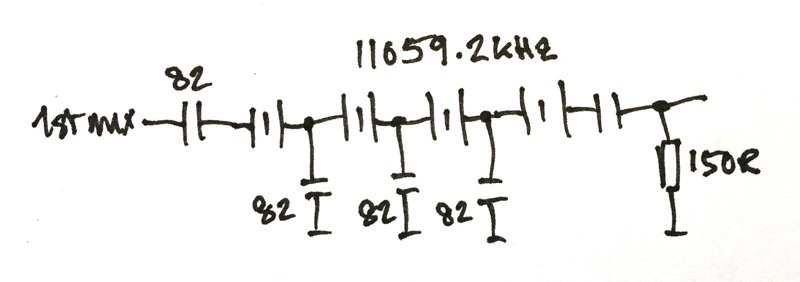
So the next step is to try out a Xtal filter. I have four 11059.2kHz xtals and have wired them up like this
I tried them out on the breadboard, which is not the best place to build a xtal filter! I connected the input directly to the Si5351 SIGGEN output and measured the response using my RF Meter. The breadboard now looks like this

This is what I got

The filter is 2.9kHz wide. And to generate USB the carrier should be at 11056.2kHz, and for LSB 11059.1kHz. All is looking good. The circuit now needs an output buffer. When I have built this I will have basically the first half of my exciter done.
Subscribe to:
Posts (Atom)